Low Latency and Model Training at Modal
Sep '26
There's a very specific feeling that comes with shipping code that touches almost every single request in the product. You flip the flag and then just hold your breath. For the next few minutes, every request the product handles is running through code that I shipped. I sit there refreshing the latency dashboard every few seconds, half expecting to watch the line jump. It doesn't move. The graph looks exactly like it did an hour before, which was the best possible result, yet somehow the least satisfying one.
This summer I interned at Modal, a serverless cloud platform for running compute-heavy AI and data workloads. I split the summer across the product engineering and training teams, where I learned about building low-latency systems and training models with reinforcement learning.
Part 1: Environment-Level Budgets
I started on the product engineering team, which owns the parts of Modal that customers touch most directly: the core dashboard, auth, observability, and the enterprise features that make bigger companies comfortable betting large workloads on us.
If you've ever worked with enterprises, you know they always ask for more granular control over their data and spend. On Modal, customers typically own a workspace, and inside each workspace can live several environments. In the past, Modal billed and enforced spend at the workspace level: set a budget, and once usage hits it, new work is blocked and running work can be preempted.
That works fine until you look at how customers use Modal nowadays. Often customers split up their workspace into separate environments — one per team, per researcher, or split across dev, prod, and staging. A single workspace-level dial isn't enough to prevent, for example, a runaway agent in some research environment from quietly draining the same budget that keeps production alive. With the use-cases being consistent across enterprises, the need was clear: let managers set a budget on an individual environment, and make it behave exactly like a workspace budget, just one level down.
It seemed simple.
My first instinct was that this was trivial. Workspace budgets already existed, so surely I'd add the same fields one level down, mirror the enforcement, and call it a day.
For workspaces, every enforcement check already read a flag out of our shared cache that says whether the workspace spend limit has been hit. My naïve plan to support environment budgets was to just read a second flag, the environment's, right next to it. So we'd go from 1 to 2 cache reads on every check. Easy.
But alas, there are always implicit tradeoffs. The problem is where those checks live. Budget enforcement sits on many of the hottest paths in the product: every sandbox creation, every endpoint deployment, among many others. Adding a second cache read to each of these is a tax on the exact thing we sell: low latency. When someone calls a function or spins up a sandbox on Modal, the time between the request and their code actually running is a core value proposition. Before this, I'd never written code where a single extra cache read could be considered expensive, but here I learned to treat latency as a first-class product concern.
So what did low latency mean in practice?
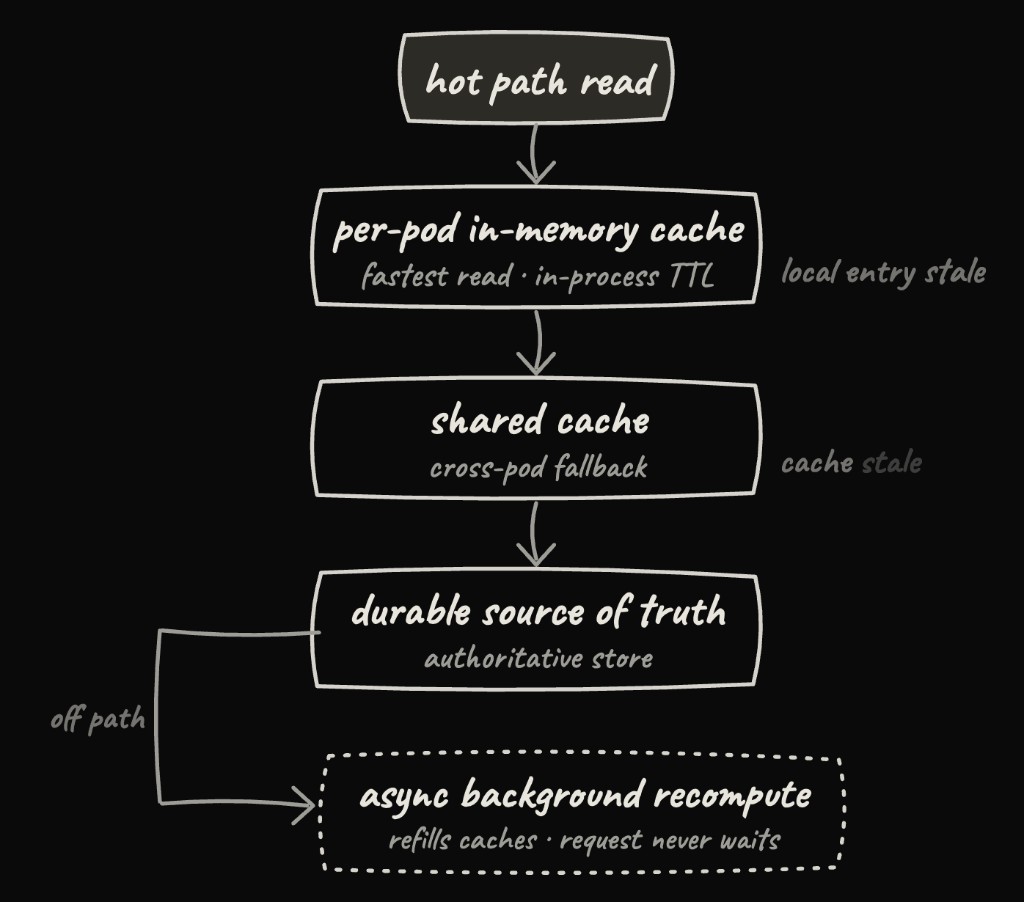
Every enforcement check was already making a round trip to the shared cache, so the second (environment-level) read only comes for free if the whole read path gets faster first. What we landed on is a layered caching architecture. Instead of every hot path reaching all the way out to the shared cache, it first reads from a per-pod in-memory TTL cache — the fastest read there is, right inside the process. When that local entry goes stale, the path falls back to the shared cache. And only when the shared cache itself is stale does anything reach the durable sources of truth. That final recompute runs asynchronously in the background, so the request that triggered it never has to wait.
Generalizing this local cache into the read path for budget enforcement is what let environment budgets come essentially for free on latency, while also improving the existing system instead of bolting a second one alongside it.
It always comes back to simplicity.
By the time I'd landed on the caching approach above, I'd been through enough dead ends on smaller decisions to notice a pattern: every design I abandoned was one I couldn't hold in my head all at once, and every one I actually shipped was one I could explain clearly.
The clearest example here was the refresh question. Should refreshing a customer's usage be done in an async background loop on a fixed interval? Queued up on every hot-path read? Some mix, depending on how stale the caches were? Each option was individually defensible but when whether a given request got blocked depended on how stale each cache layer happened to be at that moment, I knew it wasn't the right approach. Nobody debugging a customer complaint at 3am wants to reconstruct a decision tree to figure out why someone got blocked. Our refresh rule then became as simple as: check local cache, fall back to the shared cache on a miss, fall back to the durable source only on a shared-cache miss, and refresh everything async in the background so no request ever waits on it.
The same instinct is why I refactored workspace enforcement onto the new path instead of leaving it working as it was at the time. It would've been faster to just add environment budgets on as their own feature and not touch what already worked. But then every future engineer being onboarded (see last summer's post on building for the future engineer) would rightly wonder why two nearly identical features use two different mechanisms. Collapsing them into a single centralized site that every enforcement path calls meant it was not only more elegant but also there was exactly one mechanism for future engineers to understand.
Shipping it
Writing the code was only half the work. The rest was proving it in production and building everything around it that makes people willing to trust it.
We ramped the feature flag slowly, starting with a few internal workspaces first, then a handful of pilot customers, then gradually to everyone while watching cache load and hot-path latency at every step. At the same time, I was filling in all the surface area a spend feature needs before anyone has enough confidence in it: audit logs, a Datadog dashboard tracking relevant metrics, and both internal and customer-facing docs.
As we began to roll it out, customers started to reach out unprompted to say they'd been waiting for exactly this feature. That was the clearest possible signal of impact: we'd given teams a way to isolate experimental spend without putting the rest of their workloads at risk — something that matters a lot for the ML engineering teams that use Modal in particular.
Part 2: Agent-Driven Training with Reinforcement Learning
Modal's training team is pretty new, and for my next project I was curious to see what it'd be like to work on a team closer to the intersection of engineering and research. After chatting with Joy, we landed on getting me involved with Modal's RL offering, the Training Gym. The Training Gym is an open-source RL library built on top of Modal's infrastructure that makes it easy to launch and monitor RL post-training runs.
Quick RL primer, if you're not familiar: Say you want a model to get better at solving math problems. You give it a batch of problems, let it generate a handful of attempts at each one, and score every attempt with a reward function (here, maybe whether or not the answer is correct). Then you nudge the model's weights toward whatever scored well and away from whatever didn't. Do that enough times, over enough problems, and the model gets better at math. This process is called reinforcement learning (RL).
Increasingly, people don't want to sit and monitor every RL training run themselves. They'd rather hand an agent an objective and let it do most of the work. This trend made the Gym's agent DX one of our priorities, and by the time I started, an agent pointed at the Gym could write a training config, launch a run, and watch it rip.
Where it fell short was what came after launching the run. The Gym's observability lived behind a dashboard and a set of REST APIs, so an agent reading that same surface would often end up parsing the dashboard's HTML to access it. This made it hard for the agent to reliably read the numbers it needed to make the right judgment calls. Even after it had those numbers, it often didn't know what to do with them.
So my project had two parts: (1) expose the Gym's observability in a shape built for agents (a CLI), and (2) teach the agent the judgment calls a human researcher makes (a skill).
Building the CLI wasn't really about building a CLI.
Writing the actual CLI was easy. The interesting part was figuring out how to model the data behind it. Almost all the observability in the dashboard was assembled in browser-only JavaScript on the frontend, from joining runs together to normalizing their data into something a researcher could read. Giving a CLI the same view a human gets in the dashboard meant first pulling that logic back into the backend: deciding what we store, in what shape, and how it flows out to any consumer. Once that existed, the CLI was almost trivial to write. It was just another consumer sitting alongside the dashboard, which I moved to consume the same backend.
Then came a different kind of design question: what does an interface look like when its primary user is an agent, not a person? Designing for an agent meant thinking less about whether an interface was intuitive and more about whether it gave the agent enough information to recover on its own.
To do this, I gave every command a -j / --json flag, so agents can easily parse the structured output. Errors also name the next command to run - instead of returning only run_8f2a not found, the CLI suggests trying training-gym run list --since 7d to get a list of all training runs in the past week to find the desired ID. And, the default output is human-friendly:
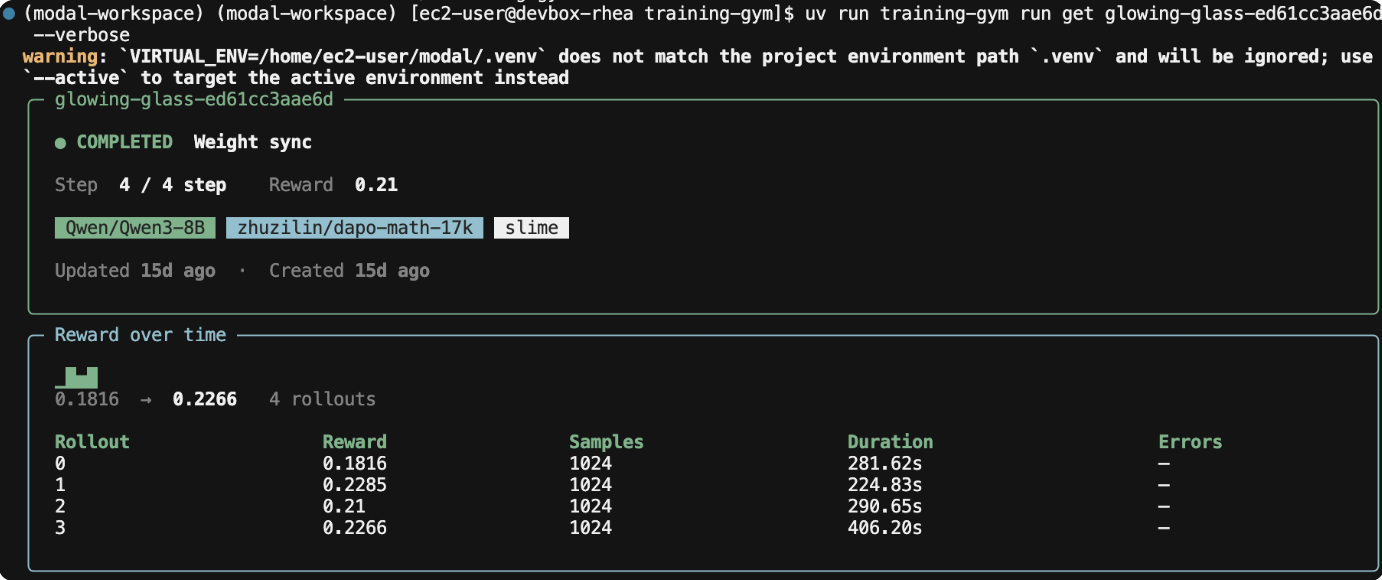
The last one might seem counterintuitive—why default to human-friendly output on a CLI built for agents? It's important to realize that nobody would hand a training run to an agent using tooling that they can't check themselves. Giving humans good signal is what makes them willing to trust the agent with it in the first place.
Why the CLI wasn't enough
OK—so now we have a CLI that gives agents real observability into a training run. Are agents smart enough to post-train a model with just that? I wish... On the very first run, the agent couldn't even find the CLI, so it fell straight back to scraping the dashboard. That confirmed our hunch that we'd need a skill to reliably encode the knowledge the agent was missing.
Quick background on skills: a skill is a folder of instructions an agent can pull into context. Every skill's name and description get loaded into the agent's prompt permanently, while the body only loads if the agent decides the description matches what it's doing.
That constraint made the structural decision easy. A family of sibling skills would have meant several always-on descriptions competing for attention, so I instead went with one skill, plus references it pulls in on demand. This means there's a single description the agent always sees, and the references cost nothing until the agent needs them.
For me to write up those references, it meant running the agent-driven training myself and seeing where the agent's failure modes were. The loop was always the same: run the agent, watch it fail, understand the missing pieces of research judgment, teach it to the agent, and repeat.
The first failures were behavioral. The agent would launch a run and then just wait, never looking at it again until it finished. That essentially rendered all the in-flight run observability in the CLI I'd built useless. Then came the harder ones. For example, knowing when to cut losses on a run is a judgment call humans get wrong too, and the agent often struggled to know when to quit. This made me add early stopping conditions to the skill, which informed future agent-driven training runs.
Learning how to train models
Watching an agent fail at RL over and over, in fast-forward, taught me a lot about RL itself. Some interesting runs taught me:
1. Reward is just a proxy. A rising reward curve doesn't necessarily mean the model is getting better — and with some algorithms it can be more misleading than that. GRPO (Group Relative Policy Optimization) is the workhorse behind a lot of RL post-training. The way it works is that for each prompt, you sample a group of responses, score them all, and push the model toward the ones that beat the group average and away from the ones below it. DAPO builds on GRPO with a handful of tweaks, one of which is dynamic sampling: it throws out any prompt where the whole group gets the same score (all correct or all wrong), because a group with no spread gives no useful learning signal. As the model improves, it starts acing the easy prompts, so those get filtered out and the batch fills up with harder ones. The result is that the average training reward can flatline or even drop while the model is genuinely getting better. You're just grading it on a harder exam every step. This was a caveat I had to include in the skill after seeing an agent stop several runs early because of the misleading training reward curve.
2. Look at the outputs. At one point I was training a model to be funny, and the reward curve looked beautiful. Then I pulled the traces and found that the model had converged on a galaxy-themed answer template that reliably fooled the LLM judge into scoring it high. The model had just found a way to hack the reward, which was based on an LLM judge (side note, if you want Qwen3-30B-A3B to think you're hilarious, all you need is some galaxy-themed gibberish). In this scenario, the reward curve just showed us what the scorer thought, unlike the outputs which tell you what the model actually learned.
The broader takeaway: some of the most complex parts about training are whether your reward measures the behavior you care about, whether the evidence justifies more compute, whether an improvement generalizes, and what the next experiment should isolate. A good training loop is really a process of reducing uncertainty: form a hypothesis, design an experiment that tests it, inspect what happened, decide what to try next. Building the agent forced me to make that loop explicit, because anything I left implicit turned into something the agent eventually got wrong. Trying to teach it made me more deliberate about how I run experiments myself.
It worked!
To test it, I was deliberately vague with prompts like “can you post-train a model to always rhyme.” Before spending a single cent on a GPU, the agent recognized that the reward was trivially gameable (a model can score well by producing rhyming nonsense), so it wrote the reward scorer as a separately tested module and ran it against rhyming, non-rhyming, and degenerate outputs to catch a real exploit up front. Then it killed a slow config early and trained a working model. See demo of this example below:
By the end, the impact wasn't just that an agent could launch training runs. It could take an underspecified objective and make most of the decisions that turn it into a real experiment: choose and test a reward, diagnose failures, inspect traces, iterate on configs, and decide when more compute wasn't justified.
If you want to install the skill and use the CLI to run your own agent-driven training, it's all here.
Shoutouts
I've had an amazing time interning at Modal this summer, and a lot of that is because of the people I got to work with. Huge thanks to Joy for taking me on and shaping my training project around exactly what I wanted to learn from it; Can for bringing me into customer conversations and helping me think about what a feature needs beyond the code; Peyton for answering my endless stream of questions and making training ideas click super well during our 1:1s; Octavio for showing me the ropes and helping me find my footing on the team so quickly; and the rest of the training and product engineering teams for making this such a great summer!